I have a Trezor Model T with the latest firmware and use Trezor Suite in the browser.
Lately I’ve been using it very often and there has never been any problem accessing my coins.
Today, when trying to log into the wallet with a passphrase, I saw a window saying that this passphrase is empty and has never been used (as I recall, this happens when the wallets under that passphrase have no funds).
I was surprised and started to worry, disconnected the Trezor, reopened the browser, and tried again with the same passphrase.
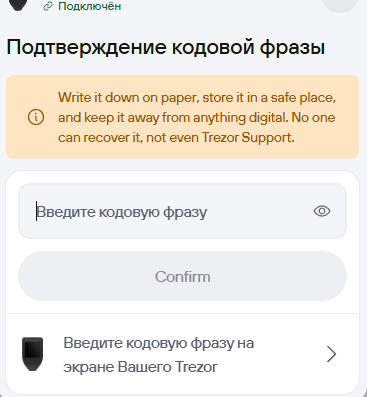
That window popped up again, I decided to click a button like open anyway, and then a window appeared asking to confirm re-entry (attaching a screenshot). I entered my passphrase again and, to my surprise, my wallet with coins opened.
Saying I was scared would be an understatement.
I didn’t clear the site cookies, my IP is the same. After that I tried to reproduce that window but couldn’t. Now it logs in with my passphrase consistently.
Can you clarify what might have caused this behavior? I’m inclined to suspect the firmware, because before it appeared nothing like this had ever happened in many years.
I don’t know anyone who could look into the issue more deeply. I hope you can help @matejcik
Trezor firmware doesn’t have any idea of whether the passphrase you’re using has any funds or not, or whether it has ever been used.
Given that (1) it was Suite claiming that the passphrase is empty, and (2) it was Suite that nevertheless loaded the account, with the exact same passphrase, I’m very confident that firmware had nothing to do with this.
But still, I don’t think my situation is the first ever, is it?
What could be the cause—could something be wrong with the connection between Trezor Suite Web and the new firmware at my Trezor?
Based on your information that my Trezor itself doesn’t know about the passphrase or the presence of funds under it, the issue is in Trezor Suite.
I’ve found a pattern: when I open my regular wallet without a passphrase and the balance of my coins is displayed incorrectly (shows a zero balance), then if I open the wallet with a passphrase afterward, those windows pop up saying the wallet I’m trying to open is empty.
But if, by refreshing the page with F5/Ctrl+F5, I get the balance to display correctly in the regular wallet, then switching to the wallet with a passphrase lets me in without any messages.
I’d like to know what causes the balance display instability in Trezor Suite; there are no problems with my connection (I’m also not using a VPN/Proxy).
I tried digging into this problem a bit more and found another scenario where it shows up.
If you first log into the regular wallet, then switch to the passphrase-protected one, and just close the tab without ejecting the wallets (auto-eject is turned on) and without unplugging the Trezor from USB — then next time you open Trezor Suite the balance in USD shows as $0 again, even though the token balances are still there.
After triggering this bug, if I eject the regular wallet and let Trezor reload it, the balance shows correctly. But if I then try to open the passphrase wallet again, I get a pop-up saying that the wallet with this passphrase is empty. Once I confirm the passphrase though, it does open my wallet with the coins, and this time the balance in USD displays correctly too.
I still can’t figure out what’s causing this or what I can do about it — I just wish it worked smoothly like it did in previous years.
Could someone from the forum team look into this, or should I reach out via email for support instead?
I just experienced the same issue as you. I got the problem after i went inside settings and turned on “auto eject wallet upon closing trezor”.
I kept getting empty balance upon entering the correct phrase but when i create new wallet with the existing phrase, the correct balance would show up.
After I turned the auto eject setting off… and manually eject all wallets each time upon using, things went back to working order again.
I turned that feature on not too long ago too. I thought maybe it was causing the issue, but I haven’t tested it yet.
We just have to wait for the devs to respond, but no matter how many times I tag them in the ticket, they keep ignoring me for some reason.
I also tried emailing them, but unfortunately didn’t get any proper explanation — after a couple of replies, they’ve been ignoring me for over four days now. @matejcik@NickW
Did you see an empty balance in coins or in $?
You just wrote about creating a new wallet — what did you mean by that?
Did you click “add wallet” again, enter the phrase, and the balance was displayed correctly?
In my case, if it says “the passphrase is empty,” entering it again makes the coin balance show up correctly — but sometimes the value in dollars still shows as 0 for some reason.
Then yes, you have the same bug as I do.
Maybe I should disable that feature and give it a try too — thanks for sharing your situation.
At least now there are two of us with the same bug and a possible cause. It’s a pity the developers are still ignoring it
I had the same issue. I recently toggled the auto-eject option but had no issues until I updated the suite version. Then I got the 0 balance issue. Scared me. I had another computer where I had not updated the suite software or toggled that button and it reliably loads with no issue. Incidentally I updated the firmware to the most recent version and it did not appear to be the cause of this issue. I think it is the updated suite software.
It looks like the issue with the web version of Trezor Suite has disappeared and hasn’t shown up again - maybe they’ve fixed it, although the developers who were replying to my emails didn’t mention anything about it
I am having the same issue every single time I use the Suite (Windows), regardless of whether ‘auto eject’ is on or off. Every time I enter my passphrase, it says the wallet is empty and I need to confirm it again. Then it loads correctly. This is going on for the last 2 or 3 versions.
We have identified the issue in Trezor Suite when the internet connection is unstable or slower, the passphrase wallet may not correctly load balances. A permanent fix is already in progress and should be released as soon as possible. Your funds are safe.
In the meantime, here are a few temporary workarounds you can try:
Retry access multiple times: Please try opening the passphrase wallet several times in a row. Even if it shows as empty, continue, the balances may load on one of the subsequent attempts.
Switch your network connection: If you’re on Wi‑Fi, try connecting via cable, using mobile data (hotspot), or testing a different Wi‑Fi network.
spent most the day panicking thinking I’d lost my funds. feels like I’ve aged a few years. to a point I thought if I do recover I’m moving from Trezor (which has been great until now). only just found this post. none of the above work for me, I can’t get my balances from any accounts with a passphrase. please fix urgent.