Trezor, as a hardware device, supports all types of BTC accounts. The only difference is what app/wallet is used with Trezor.
Trezor Suite supports all three types of addresses (BTC accounts):
Legacy beginning with 1, Segwit beginning with 3, Native Segwit beginning with bc1
Trezor Wallet, on the other hand, supports only:
Legacy beginning with 1 and Segwit beginning with 3
Therefore, Trezor Suite is recommended.
- Navigate to Accounts tab from the upper menu
- Click on the plus [+] symbol on the left pane
- Choose Bitcoin from the list, select Account type, and confirm the selection by clicking on ‘Add account’
- See your BTC accounts listed on the left pane
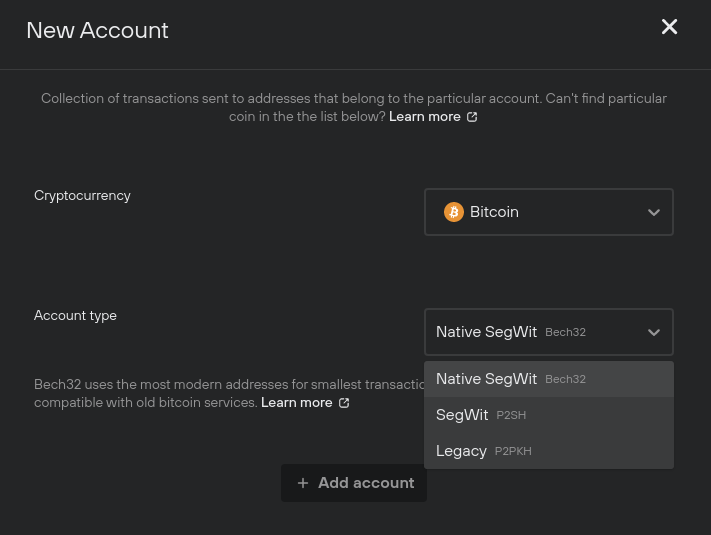
If you have previously used more BTC accounts, simply repeat the process. The accounts will be always generated in the same order.
If you want to see your balance in both interfaces (Trezor Wallet and Trezor Suite), you are going to need to use either “3” Segwit addresses or “1” Legacy addresses.
Feel free to learn more about different BTC accounts from our blog post https://blog.trezor.io/bitcoin-addresses-and-how-to-use-them-35e7312098ff
In case you want to keep it simple, use one interface, and one account. Learn more about wallets, accounts and addresses https://blog.trezor.io/wallet-accounts-and-addresses-bdfa6b66b037