I have sent eth from binance to trezor via Arbitrum One. In Arbiscan and Binance all success. But eth not seen on my balance. What can i do now? Please assist.
First of all, you need to understand that if you are using a bsc chain on an exchange, there will definitely not be any display on your suite. You need to view your assets on the bsc chain. The suite only supports the erc20 chain.
I see my eth on Arbiscan chain. But not in my balance. Is it possible connect trezor suit to metamask that already has arbitrum smart chain, and, can i see and manage with my eth in metamask in this case?
may be you can
you have to choose the same address as your suite eth address for wallet MM-trezor.
Very thanks, will try.
Did you manage to get your eth?
Hi @Jan,
ETH sent via the Arbitrum network can’t be seen in Trezor Suite as this network is not natively supported in Trezor Suite. You need to use 3rd party app MetaMask, information on how to connect Trezor to MetaMask: How to use Trezor with MetaMask
Then you need to add the Arbitrum network which is so-called EVM (Ethereum Virtual Machine) chain. Example on how to add EVM to MetaMask (with a different EVM though): How to use EVM compatible chains with Trezor (Matic, Avax)
(you need to find “Arbitrum One” on chainlist.org and add this network)
Hi radekP,
allow me to ask something that apparently has been extensively discussed in other forum. I am aware that I might ask the same question that was already asked to you and the team, if that is the case, please guide me to the right discussion where I can find a solution. Here is my problem:
- yesterday night I wanted to move a small amount of ETH from my kraken account to my hard wallet TREZOR. Differently from the other times I wanted to save fees and I dediced to do it via Arbitrum one rather than Etherium network. As conseguence I transferred the founds but I cannot see them on my Trezor device. I understand I can fix it by using metamask, which I have installed and have an account activated on my device. Can you please guide me now how to move forward with it? I already encountered a difficulty while trying to add the trezor in metamask as it does not appear (only ledger for instance it appears).
I am here eager to learn something new from you and team.
Thanks,
walter
Hi Vitaliy123,
allow me to ask something that apparently has been extensively discussed in other forum. I am aware that I might ask the same question that was already asked to you and the team, if that is the case, please guide me to the right discussion where I can find a solution. Here is my problem:
- yesterday night I wanted to move a small amount of ETH from my kraken account to my hard wallet TREZOR. Differently from the other times I wanted to save fees and I dediced to do it via Arbitrum one rather than Etherium network. As conseguence I transferred the founds but I cannot see them on my Trezor device. I understand I can fix it by using metamask, which I have installed and have an account activated on my device. Can you please guide me now how to move forward with it? I already encountered a difficulty while trying to add the trezor in metamask as it does not appear (only ledger for instance it appears).
I am here eager to learn something new from you and team.
Thanks,
walter
Hi @walterino,
Every information you need is in the last post from me in this thread: Wrong balance or transfer lost via Arbitrum One - #7 by radekP
Simply put, you need to follow these steps:
- Connect Trezor to MetaMask (make sure to choose the connect the ETH address that includes your ETH on the Arbitrum network). You need to choose the correct derivation path:
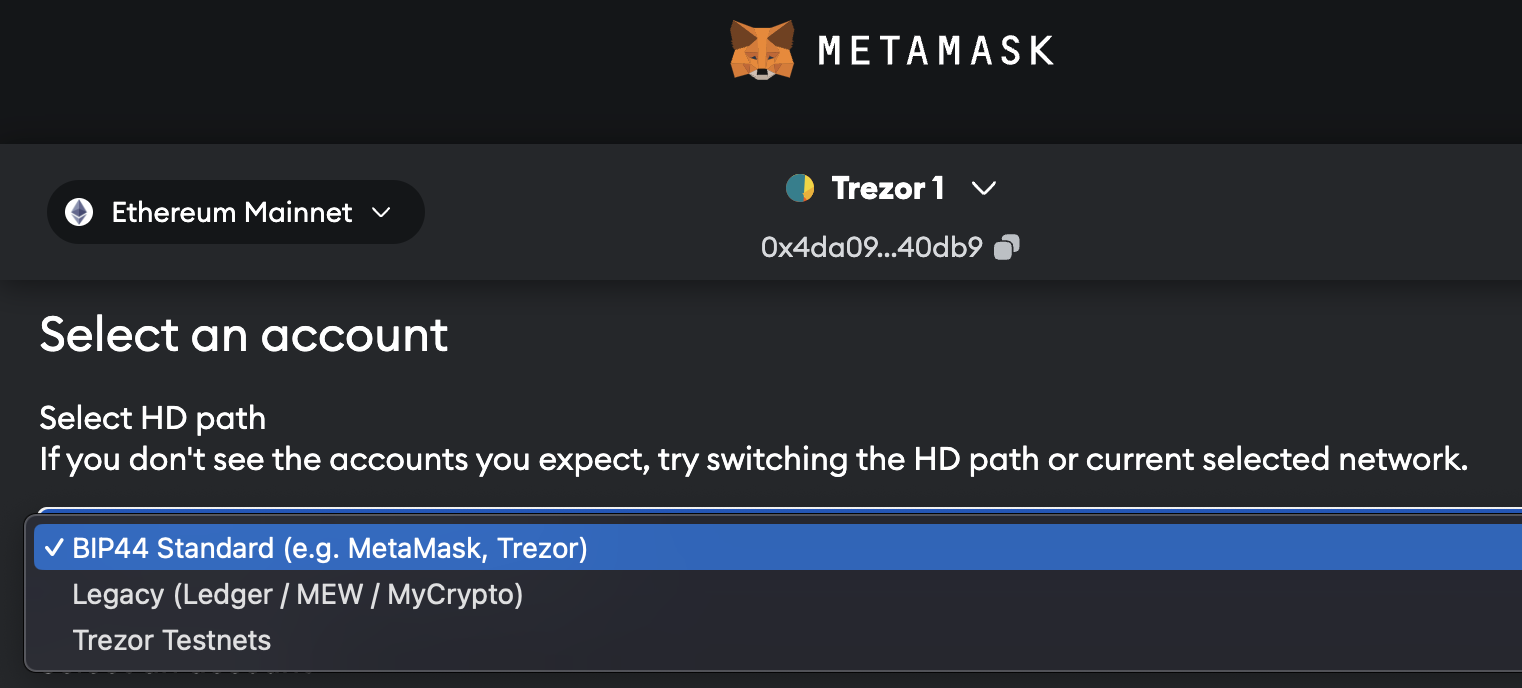
-
Then you need to add the Arbitrum network which is so-called EVM (Ethereum Virtual Machine) chain. Example on how to add EVM to MetaMask (with a different EVM though): How to use EVM compatible chains with Trezor (Matic, Avax)
(you need to find “Arbitrum One” on chainlist.org and add this network) -
You should see your ETH stored via the Arbitrum network. If you want to see these ETH in Trezor Suite, you need to send them back to your exchange and then send it from the exchange to your ETH address, this time using the native Ethereum network.
ok, thanks for now. I will try later at home. I appreciate. I will let you know how it goes. Btw, I am really impressed by your knowledge and prompt support. I hope I can get back my ETH.
do you mind me guideing me step by step. I would start form item 1 to connect Trezor to Metamask. Where from Arbiscan page (which I retrived) can I find the correct ETH address that includes my ETH on the Arbitrum network? From that page I can see:
- the transaction hash
- the “from” address
- the “to” address
It is the ETH address that you used for sending the funds. From your description, it looks like you have the details of the transaction. If this is the case it should be the ETH address that you see in the “To” section.
1 Like
I got it thanks, it is the one indicated with “to” from the detail of the transaction that I have retrieved from Arbiscan. Now I have another problem, when I open my MetaMask app and I try to “add an hardware wallet” I can only see LEDGER or QR-based but not the TREZOR as indicated in the instruction instead. any idea?
Hi @radekP
I am happy to inform you and the team that last night I managed to solve the issue and retrive the funds that I believed were lost. I followed the instructions you provided and I managed to get them back by connecting Trezor with Metamask. By doing to I could see the transation after having added Arbitrum One network. So I could send them back to my Exchanger (still using Arbitrum One) and from the Exchanger I could then send to the Trezor (this time using the Etherium network). All good. I am so happy to have learnt something new from you guys. I hope this post would serve other users that might face the same situation.
Best regards.
1 Like
Hi @walterino,
Great to read you managed to move your ETH from the Arbitrum network to the main Ethereum network 
1 Like